UI/UX law
// Perception & Gestalt;
Tabular Numerals
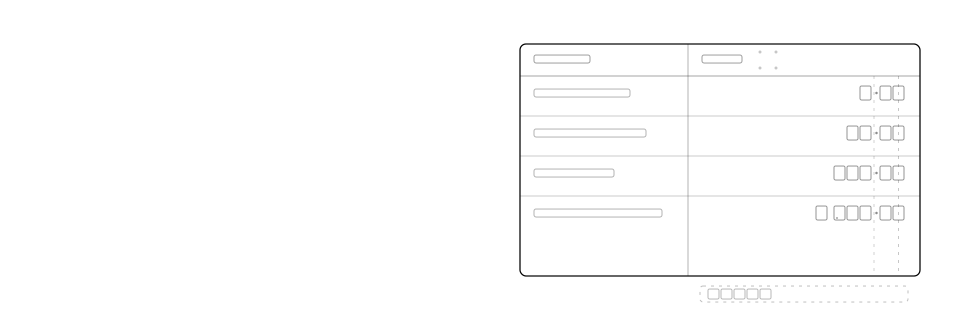
Numeric values in a table should be right-aligned and set in tabular (fixed-width) figures, so every digit column, including the decimal point, lines up vertically from row to row.
Mechanism
Why it happens
Most typefaces ship proportional figures by default, where a "1" is narrower than an "8" the same way a lowercase "i" is narrower than a "w". Stack numbers of different lengths and left-align them, and the ones place lands in a different spot every row. Even right-aligned, proportional digits still drift out of column because their widths vary row to row, so a $9.00 and a $199.00 won't share a decimal point. Tabular figures (font-variant-numeric: tabular-nums) give every digit the same fixed advance width, the way a monospaced font does; combined with right-alignment, that anchors the ones place and forces every column, tens, decimal point, cents, into a single vertical line. Comparing magnitude becomes a shape judgement the eye makes pre-attentively, not a task of reading each number in full.
Impact
Why it matters
- Proportional figures are the default in almost every UI typeface, so misaligned digit columns are the common case unless tabular figures are set deliberately
- Right-alignment alone doesn't fix it. Without tabular figures, the decimal point still lands in a different column on every row
- A misaligned column forces people to read each full number to compare it; an aligned one lets them compare by glancing at column position and length alone
- The failure is easy to miss in design tools that default to tabular figures for editorial text, then ship without it on the live numeric data
Example
Without vs. with
A pricing table lists Starter $9.00, Pro $29.00, Team $199.00, and Business $1,299.00 left-aligned in the default proportional font, so neither the digits nor the decimal points share a column.
The same table right-aligns each price and sets tabular-nums, so every ones digit and decimal point falls in the same vertical column, and the jump from $29.00 to $1,299.00 reads at a glance.
Checklist
How to apply it
Right-align every numeric column in a table; never left- or centre-align a column of numbers
Set font-variant-numeric: tabular-nums (or the Tailwind tabular-nums utility) on numeral cells so digit widths become fixed
Confirm the typeface actually has a tabular figure variant; fall back to a monospaced font for numerals if it doesn't
Keep decimal precision consistent within a column (always two places for currency, say), so the decimal point sits in the exact same column on every row
Recipe
Code example
Where it shows up